We all want to know what our students are reading. Although I talk to kids all day about books, it seems, there is still a lot that needs to be uncovered about what each reader prefers and how much reading kids are actually doing. In the past, I have tried reading logs with varying degrees of success. With over 800 kids in my building this year, paper reading logs would be a lot to keep track of. Instead of going that route, I am trying a Google Form.
I had several thoughts when it was mentioned that we should keep track of student reading with a physical reading log. First, I tend to use an electronic format (GoodReads) as an adult. I'm guessing that is a more natural behavior for students as well--social media as a reading log. I also considered the idea that I wanted a quick, "What did you read? Did you like it?" more than I wanted to create another assignment that needed to be monitored. Since we are moving to using Google Apps for most things in our district, I then considered what it might look like to integrate this into my students' regular use of technology.
After bouncing the idea off a couple of the ELA teachers I work with regularly, I came up with a basic form that might take a student five minutes or less to complete. I want to gather basic data, so I asked about grade level and team, but beyond that, I am looking for a more minimal approach to reporting what was read and liked or disliked. I have connected the form to my library website and am asking the staff to connect it to their blogs and/or Google Classrooms. Since the data comes in on a spreadsheet format, we should be able to look at data by grade level, as well as team. Kids can easily complete the form during their library time, as well as any other time they have technology in their hands.
I'm hopeful that this solution will give me a window into the reading interests of my students, as well as provide much-needed data reading patterns of middle school students in general. What format(s) are you using or have you used to collect reading data in your classroom or school?
Wednesday, October 5, 2016

Tuesday, September 13, 2016
Tinker Zoo Was the Coolest
I'm always looking for an opportunity to participate in professional development activities during the summer. I especially like hands-on experiences--no sit and get for me! This summer I had the opportunity to attend Tinker Zoo Maker Camp at Kalamazoo RESA. The REMC has a great lending library of hands-on maker tools that are available to those who have attended this training. With all the hype about making, I was excited to have a chance to try out some of the hottest toys for myself.
What I liked best about the day was that we had time and space to play. There were stations with plenty of materials and some direction, but there was still lots of room for exploration, experimentation, and creativity. The set up got me thinking about how this can translate to libraries and schools. Where and when do we offer hands-on activities that allow students to work alone and/or collaborate? Are there opportunities to try and fail and try again? Has the messiness of creating and problem-solving been taken over by the scripted nature of school in the era of standardized testing? If so, are libraries, as many have suggested, one of the keys to bringing back more hands-on tinkering to schools?
I don't necessarily know the answers to these questions. My day of training got me interested in doing more exploring and learning. I would especially like to work on how I can support curricular needs, while offering hands-on opportunities within the library space. I recently viewed a tutorial on bookmark making. I'm considering that as a place I might start: simple sewing, gluing, magnets, cutting--with lots of options to create something both useful and personal. It requires a lower monetary investment, but allows for lots of hands-on work.
However, I'm also planning to borrow some items from KRESA and maybe even doing a Donors Choose fundraiser to purchase some items of our own. After all, look at all the fun we had:


What I liked best about the day was that we had time and space to play. There were stations with plenty of materials and some direction, but there was still lots of room for exploration, experimentation, and creativity. The set up got me thinking about how this can translate to libraries and schools. Where and when do we offer hands-on activities that allow students to work alone and/or collaborate? Are there opportunities to try and fail and try again? Has the messiness of creating and problem-solving been taken over by the scripted nature of school in the era of standardized testing? If so, are libraries, as many have suggested, one of the keys to bringing back more hands-on tinkering to schools?
I don't necessarily know the answers to these questions. My day of training got me interested in doing more exploring and learning. I would especially like to work on how I can support curricular needs, while offering hands-on opportunities within the library space. I recently viewed a tutorial on bookmark making. I'm considering that as a place I might start: simple sewing, gluing, magnets, cutting--with lots of options to create something both useful and personal. It requires a lower monetary investment, but allows for lots of hands-on work.
However, I'm also planning to borrow some items from KRESA and maybe even doing a Donors Choose fundraiser to purchase some items of our own. After all, look at all the fun we had:
 |
| We soldered our own blinky robot badges |
 |
| I thought soldering was awesome. Had to hold myself back from purchasing and soldering iron. |
 |
| Using straws and connectors to build in 3D. Apparently there is a diecut out there than can be used to create your own connectors. We drove robots over straw bridges. |
 |
| I liked the littlebits the best. The pieces hook together to make actions happen: ring a buzzer, turn on a light . . . and my favorite: blow bubbles using a fan. |


 |
| My bubble! |
 |
| Snap Circuits are a cool way to understand the flow of electricity. |


 |
| Ozobots are tiny coding robots. We created color trails and the ozobot would follow our pathways. |
 |
| The Osmo allowed us to use and iPad to teach coding and gaming. I didn't play with this nearly enough--lots of cool ways to use it. |
 |
| We have over 100 iPads and I see the possibility of kids getting really into using Bloxels to create characters, worlds, and whole video games. This intrigued me and I saw applications for my students right away. |
 |
| Dash and Dot are robots that can be taught actions through coding. |
Tinker Zoo Was the Coolest
I'm always looking for an opportunity to participate in professional development activities during the summer. I especially like hands-on experiences--no sit and get for me! This summer I had the opportunity to attend Tinker Zoo Maker Camp at Kalamazoo RESA. The REMC has a great lending library of hands-on maker tools that are available to those who have attended this training. With all the hype about making, I was excited to have a chance to try out some of the hottest toys for myself.
What I liked best about the day was that we had time and space to play. There were stations with plenty of materials and some direction, but there was still lots of room for exploration, experimentation, and creativity. The set up got me thinking about how this can translate to libraries and schools. Where and when do we offer hands-on activities that allow students to work alone and/or collaborate? Are there opportunities to try and fail and try again? Has the messiness of creating and problem-solving been taken over by the scripted nature of school in the era of standardized testing? If so, are libraries, as many have suggested, one of the keys to bringing back more hands-on tinkering to schools?
I don't necessarily know the answers to these questions. My day of training got me interested in doing more exploring and learning. I would especially like to work on how I can support curricular needs, while offering hands-on opportunities within the library space. I recently viewed a tutorial on bookmark making. I'm considering that as a place I might start: simple sewing, gluing, magnets, cutting--with lots of options to create something both useful and personal. It requires a lower monetary investment, but allows for lots of hands-on work.
However, I'm also planning to borrow some items from KRESA and maybe even doing a Donors Choose fundraiser to purchase some items of our own. After all, look at all the fun we had:
What I liked best about the day was that we had time and space to play. There were stations with plenty of materials and some direction, but there was still lots of room for exploration, experimentation, and creativity. The set up got me thinking about how this can translate to libraries and schools. Where and when do we offer hands-on activities that allow students to work alone and/or collaborate? Are there opportunities to try and fail and try again? Has the messiness of creating and problem-solving been taken over by the scripted nature of school in the era of standardized testing? If so, are libraries, as many have suggested, one of the keys to bringing back more hands-on tinkering to schools?
I don't necessarily know the answers to these questions. My day of training got me interested in doing more exploring and learning. I would especially like to work on how I can support curricular needs, while offering hands-on opportunities within the library space. I recently viewed a tutorial on bookmark making. I'm considering that as a place I might start: simple sewing, gluing, magnets, cutting--with lots of options to create something both useful and personal. It requires a lower monetary investment, but allows for lots of hands-on work.
However, I'm also planning to borrow some items from KRESA and maybe even doing a Donors Choose fundraiser to purchase some items of our own. After all, look at all the fun we had:
|
| We soldered our own blinky robot badges |
|
| I thought soldering was awesome. Had to hold myself back from purchasing and soldering iron. |
|
| Using straws and connectors to build in 3D. Apparently there is a diecut out there than can be used to create your own connectors. We drove robots over straw bridges. |
|
| I liked the littlebits the best. The pieces hook together to make actions happen: ring a buzzer, turn on a light . . . and my favorite: blow bubbles using a fan. |
|
| My bubble! |
|
| Snap Circuits are a cool way to understand the flow of electricity. |
|
| Ozobots are tiny coding robots. We created color trails and the ozobot would follow our pathways. |
|
| The Osmo allowed us to use and iPad to teach coding and gaming. I didn't play with this nearly enough--lots of cool ways to use it. |
|
| We have over 100 iPads and I see the possibility of kids getting really into using Bloxels to create characters, worlds, and whole video games. This intrigued me and I saw applications for my students right away. |
|
| Dash and Dot are robots that can be taught actions through coding. |
Thursday, June 16, 2016
Summer Reading: KPS Reading Lists
Each year, the librarians at KPS create curated lists for each grade level for summer reading. The lists include both fiction and nonfiction and our aim is to have high-interest books that might also have curricular ties. The lists are linked below for easy viewing:
Rising Sixth Grade
Rising Seventh Grade
Rising Eighth Grade
Rising Ninth Grade
You can also find the lists on KPL's website (scroll to the bottom to access all grade levels) and the books that KPL has are linked in lists on the online summer reading site from KPL for easy access.We hope you will check out some of these recommended books--there is truly something for everyone!
Rising Sixth Grade
Rising Seventh Grade
Rising Eighth Grade
Rising Ninth Grade
You can also find the lists on KPL's website (scroll to the bottom to access all grade levels) and the books that KPL has are linked in lists on the online summer reading site from KPL for easy access.We hope you will check out some of these recommended books--there is truly something for everyone!
Friday, May 27, 2016
Summer Reading: Going Digital with KPL


I mentioned audiobooks as a great way to multitask in my initial post about summer reading a few days ago. Did you know that the public library offers digital resources through two different services? Patrons can use Hoopla to stream or download audiobooks (as well as music and movies) and Overdrive (or another preferred reader/audio app or desktop) to download audiobooks and ebooks through the Midwest Collaborative for Library Services. This connects us to thousands of resources without ever having to leave home. If you don't have an internet connection, you can use the public, free wi-fi at KPL to download items to your device and enjoy them anywhere you plan to go. For both of these resources, a KPL library card is required for verification that you are a KPL patron and sign up is simple--just follow the listed steps. If you don't have a library card, signing up is easy. Learn how to obtain a card here.
Thursday, May 26, 2016
Summer Reading: Public Library Programming

Summer reading really can't be separated from the public library. As schools are slowly finalizing the 2015-2016 school year, public libraries are getting geared up for their summer programming. Our local public library is trying something new this year. In addition to the traditional paper copy of a summer reading card that most kids are used to, KPL will also debut an online tracking system for summer reading and programming. The online system allows kids to sign up and then track their progress online. The tracking is divided into several categories: read (20 minutes/day), lead, explore, move, and create. The traditional "read" makes sense, but I love that there are other categories that encourage us to visit sites throughout town, take a role in getting others interested in the library, be active, and learn how to make new things.
Signing up to log reading and activities is simple. I have created a tutorial on the process. We will also be hosting public librarians who will explain the program and share the various participation options with all of our students, as well as assisting with sign up. I am excited to have a digital option that allows students who might not have transportation to the library and/or who are out of town during the summer the opportunity to participate. It will be interesting to track the data and compare it to previous efforts that we have instituted in conjunction with the public library.
In addition to having a great selection of books and movies, the public library hosts a variety of programs for all ages. The Link newsletter is delivered to homes and is also available online. It details many of the popular programs that are offered for each age group. You can log attendance at these formal programs, but there is also a chance to explore the branches and other locations around town to get secret codes that can be entered online as part of the digital game. How much fun is that?! I'm hoping to participate in many of these opportunities myself and look forward to seeing my students this way throughout the summer.
Tuesday, May 24, 2016
Summer Reading: Sync

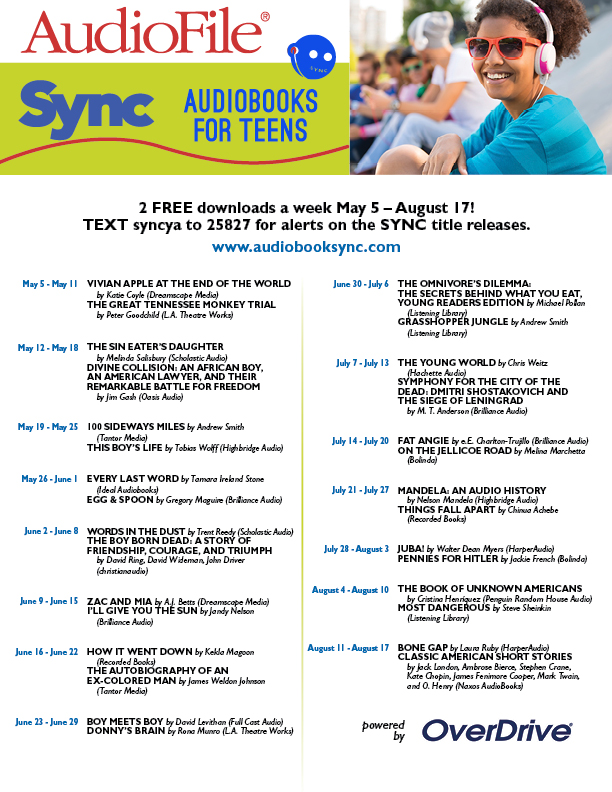
One of the exciting programs that has been available for a few years is the Sync Audiobooks for Teens. Sync offers two audiobooks per week from May 5-August 17, 2016. A new pair of audiobooks based on a weekly theme will be available each Thursday morning. A total of 30 titles are available for the summer, including lots of high interest options. Each title can be downloaded in MP3 format using the Overdrive app. The coolest part? Once a book is downloaded, it's yours to keep!
How can audiobooks be enjoyed throughout the summer?
- Listen while you walk or run
- Listen on a car ride
- Listen during a bike ride (on a safe trail--not in traffic!)
- Listen while mowing the lawn or gardening
- Listen while taking a bath
- Listen at bedtime
- Listen while doing chores
- Listen while cooking
Most people who have never tried audiobooks find them to be an enjoyable way to multitask.
The poster below lists the dates and books available each week. Give one a try and let me know how it goes!
Subscribe to:
Posts (Atom)